
Whether you’re into competitive gaming or just play for fun, one of the biggest factors that can make a difference in your experience is your gear. Your keyboard and mouse aren’t just pieces of plastic — they’re your primary tools for translating your intent into in-game actions. A slow keyboard or an imprecise mouse can cost you rounds, so choosing the right tools from the start is an investment in yourself and your time. In this guide, we’ll walk you through everything you need to know before buying a gaming keyboard or mouse.
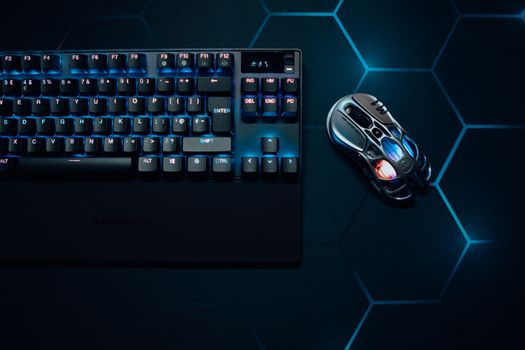
🖱️ Best Gaming Mice
Gaming mice differ from standard mice in many ways — from response sensitivity to weight and design. Here are the best options currently available:
1. Logitech G Pro X Superlight 2
Weighing just 60 grams, featuring LIGHTSPEED 2.4GHz wireless connectivity, and equipped with the HERO 2 sensor at 32,000 DPI. It’s ideal for professional players who need speed and lightness. The battery lasts up to 95 hours of continuous use, and the ergonomic design keeps long gaming sessions comfortable. This mouse is used by many professional e-sports players in world championships.
2. Razer DeathAdder V3 Pro
Excellent ergonomic design that suits medium to large hands. HYPERPOLLING 4000Hz response means ultra-fast movement transmission. Weighs 64 grams, with a battery life of up to 90 hours. This mouse is considered one of the best for competitive FPS games thanks to its high precision and comfortable design.
3. SteelSeries Aerox 3 Wireless
Extremely lightweight (68 grams), with a honeycomb design that allows for ventilation and reduces weight. Supports both 2.4GHz and Bluetooth, making it perfect for users who switch between desktop and laptop. Battery life reaches up to 200 hours in Bluetooth mode and 80 hours in 2.4GHz mode. It’s considered one of the lightest gaming mice available today.
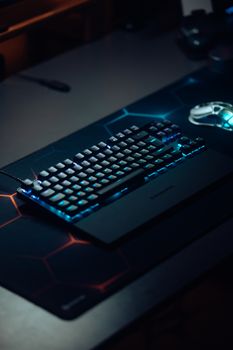
⌨️ Best Gaming Keyboards
Mechanical keyboards have changed the game. Their keys are faster, more precise, and longer-lasting than those on standard keyboards. Here are the best options:
1. Logitech G Pro X TKL SE
A TKL (Tenkeyless) layout without a numpad, freeing up space for your mouse. Features GX Clicky, GX Brown, or GX Red switches depending on your preference. It has a sturdy build, detachable cables, and a compact design that fits most setups. The price is reasonable for the quality, making it a popular choice among tournament players.
2. Razer BlackWidow V4 Pro
A full-size keyboard with Razer Green switches (clicky) or Yellow switches (linear). It includes features such as media keys, USB passthrough, and advanced per-key RGB. The aluminum build gives it high durability, and the wrist rest aلمغناطيسي مريح لساعات طويلة. لوحة احترافية للاعبين power users.
\n\n\n\n3. Keychron K8 Pro
\n\n\n\nلوحة 80% (TKL) تدعم both Bluetooth و wired. تستخدم Gateron switches hot-swappable (تقدر تغيرهم بنفسك). البناء من الألمنيوم، وkeycaps PBT double-shot لا تتآكل. مثالية لمن يريد لوحة ميكانيكية احترافية بتصميم نظيف وبدون أضواء ملونة مبالغ فيها.
\n\n\n\n⚖️ لوحة مفاتيح ميكانيكية VS لوحة عادية
\n\n\n\n| المواصفة | ميكانيكية | عادية (membrane) |
| سرعة الاستجابة | سريعة جداً | متوسطة |
| عمر المفاتيح | 50-80 مليون ضغطة | 5-10 مليون ضغطة |
| الصوت | اعتماداً على Switch | صامتة |
| السعر | أعلى | أقل |
| تخصيص المفاتيح | متاح (hot-swap) | غير متاح |
💡 نصائح مهمة قبل الشراء
\n\n\n\n- \n
- اختبر قبل تشتري: لو ينفع، جرب الكيبورد قبل الشراء أونلاين. مفاتيح switches مختلفة (Red لينة، Brown متوازنة، Green صوتية) وكل واحدة تححساس مختلف. \n
- حجم مكتبك: لوحة TKL أو 60% توفر مساحة، نمط full-size أحياناً ضرورية لو تحتاج numpad كثير. \n
- برمجة المفاتيح: غالب ماوسات وكيبوردات الألعاب تدعم برمجة macros — استخدمها بحكمة لا للغش. \n
- السعر مقابل الاستخدام: إذا تلعب 2-3 ساعات أسبوعياً، ما تحتاج أغلى equipment. إذا تلعب يومياً وتنافسياً، استثمار في أدوات جيدة يستحق. \n
- صيانة أدواتك: نظف الماوس وكيبوردك من الغبار والأوساخ بشكل دوري، خاصة لو تاكل قدام الشاشة 😄. \n
❓ أسئلة شائعة
\n\n\n\nأيه مناسب أكثر — ماوس wireless أو wired؟
\n\n\n\nالmodern wireless (2.4GHz مع dongle) تقريباً بنفس سرعة الـ wired ومافي أي تأخر ملحوظ. الـ wireless مريح أكثر بس يحتاج شحن. لو تلعب esports على أعلى مستوى، wired أعطى ثبات 100%. للغالبية، wireless كافي ويفضل.
\n\n\n\nكم DPI أحتاج في ماوس الألعاب؟
\n\n\n\nمعظم اللاعبين يستخدمون بين 400-1600 DPI. مرات أكثر DPI (مثل 32000) كلام تسويقي أكثر ما هي فائدة عملية. ابدأ بـ 800 DPI وعدل حسب راحتك. اهم شي الconsistency — ثبت DPI ولا تغيره كثير.
\n\n\n\nهل أحتاج mechanical keyboard للعب بشكل جيد؟
\n\n\n\nمش “ضرورية”، لكنها تفرق. الميكانيكال switches أسرع، أكثر دقة، وتعطيك feedback حين تضغط المفتاح. لو تلعب ألعاب تتطلب inputs سريعة (مثل fighting games أو RTS)، الميكانيكية مساعدة كبيرة. لو تلعب ألعاب casual، لوحة جيدة (حتى membrane) تكفي.
\n\n\n\nأفضل switch للألعاب؟
\n\n\n\nالغالبية يفضلون linear switches (مثل Cherry MX Red أو Gateron Red) للألعاب لأنها سلسة وبدون click — تقدر تضغط بسرعة متكررة بسهولة. الـ tactile switches (مثل Brown) جيدة لو تريد feedback بدون صوت clicky. تجنب clicky switches (مثل Blue) في الأماكن العامة لأنها صوتها عالي.
\n\n\n\nكم تعيش بطارية ماوس wireless gaming؟
\n\n\n\nتختلف حسب الماوس والاستخدام. معظم ماوسات wireless gaming العالية الجودة تعيش بين 70-200 ساعة. بعضها تدعم شحن سريع — 15 دقيقة شحن تعطيك ساعات من الاستخدام. أنصح تشتري واحد مع dongle USB-C لسهولة الشحن.
\n\n\n\nملاحظة: الأسعار والمواصفات المذكورة بحسب المتجر العالمي وقد تختلف حسب منطقتك والتوفر. ننصح بالشراء من متاجر موثوقة عشان تضمن الضمان والأصلية.
\n